
This post is also available in:
 Українська
  Русский
You open the WPML setup wizard, get through the first couple of steps — and hit a wall. Step 3 wants a Site Key you don’t have on hand. It’s on a machine back home, or maybe you just can’t locate it right now Either way, the work is blocked.
You open the WPML setup wizard, get through the first couple of steps — and hit a wall. Step 3 wants a Site Key you don’t have on hand. It’s on a machine back home, or maybe you just can’t locate it right now. Either way, the work is blocked.
The Approach
Two things need to happen:
- Clear the wizard’s saved progress from the database so it starts fresh.
- Patch the key-verification method so it always returns a passing result.
Once that’s done, WPML will treat the key as verified and let you finish the setup normally.
Step 1 — Reset the Wizard State
WPML tracks its progress via two entries in the wp_options table:
- wpml_setup_languages
- wpml_setup_url_format
Delete both records — via phpMyAdmin or a direct DB query. No database access? Add these two lines to functions.php instead:
update_option( 'wpml_setup_languages', null );
update_option( 'wpml_setup_url_format', null );
These lines are temporary. Load any page on the site and the records will be wiped automatically. Remove the code immediately after.
Step 2 — Bypass the Site Key Check
In recent versions of WPML, the key-verification logic lives in sitepress-multilingual-cms\classes\setup\Initializer.php — not in Installer.php as it used to be.
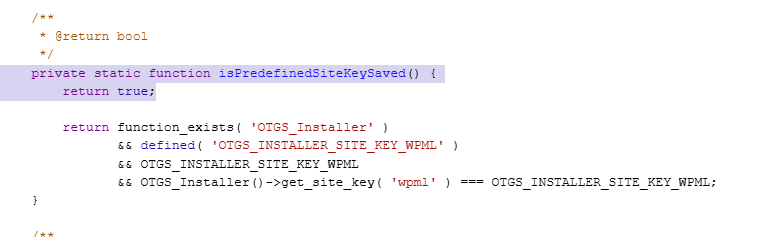
Open that file and find the method isPredefinedSiteKeySaved(). Replace its entire body with a single return statement:
private static function isPredefinedSiteKeySaved() {

    return true; // тимчасовий обхід перевірки ключа

}
Save the file and reopen the WPML wizard. It will run all the way through without asking for a key.
Cleaning Up Afterwards
- Restore the original isPredefinedSiteKeySaved() code in Initializer.php.
- Enter your real Site Key under Plugins → WPML → Account.
- Confirm that WPML and its add-ons show up in the standard WordPress updates list.
Final Note
This is a stopgap, not a substitute for proper registration. It gets you unblocked when the key simply isn’t accessible right now Once you have it, restore the file and register the site — everything will keep working, and your licence will remain valid.
⚠️ Disclaimer
The information in this article is provided for educational purposes only. The author accepts no responsibility for any consequences resulting from the methods described — including any changes to files, the database, or site functionality.
The author accepts no responsibility for any consequences resulting from the methods described — including any changes to files, the database, or site functionality. The author accepts no responsibility for any consequences resulting from the methods described — including any changes to files, the database, or site functionality.
The workaround described here is a temporary technical measure for emergency situations. The workaround described here is a temporary technical measure for emergency situations. Continued use without a valid licence violates the software’s terms of service. Please support the developers — purchase and register your licence through official channels.